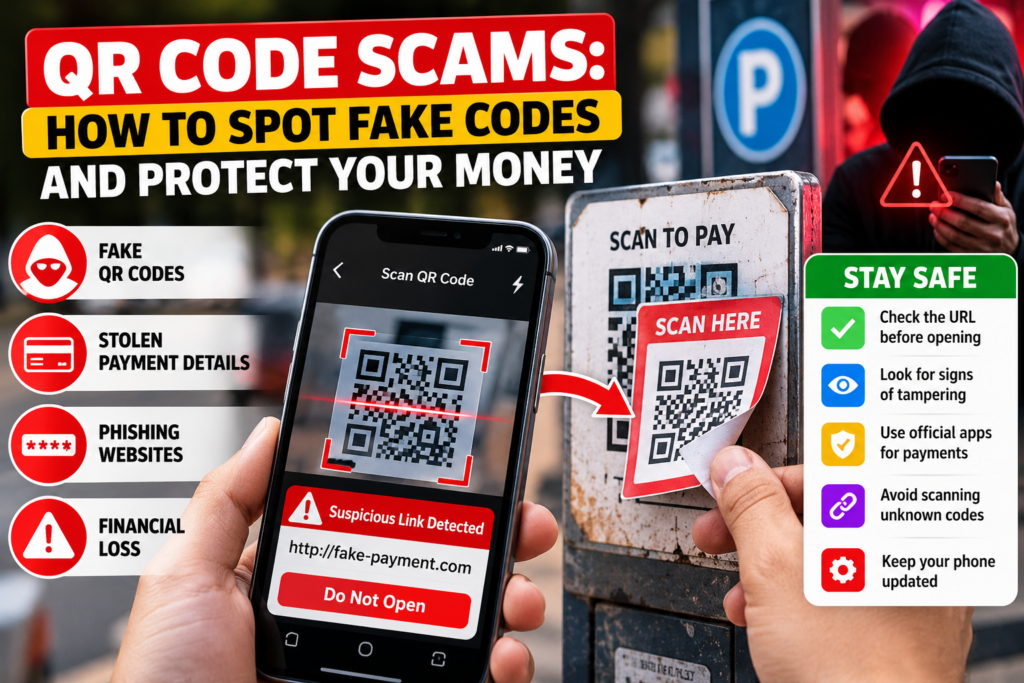

QR code scams are becoming an important concern as more people use smartphones to pay for parking, access restaurant menus, receive deliveries and visit websites.
A QR code looks simple: scan it with your phone and open the destination. Unfortunately, scammers can exploit that convenience to send users to fraudulent websites.
The danger is not the QR code technology itself. The problem occurs when someone trusts a malicious destination without checking it.
Here is how fake QR codes work and what you can do to stay safe.
What Are QR Code Scams?
QR code scams involve codes that lead users toward deceptive websites, fake payment systems or other harmful destinations.
A scammer may copy the appearance of a genuine payment notice or replace a legitimate printed code with a fraudulent sticker.
When someone scans the altered code, the website may ask for payment information, passwords or personal details.
These scams are sometimes called “quashing”, a term combining QR codes and phishing.
How Do Fake QR Codes Work?
A standard QR code contains information that a smartphone can read.
That information might be a website address, payment request or other data.
Unlike an ordinary printed link, the complete destination is not immediately visible to the person looking at the code.
Scammers exploit this limitation by directing people toward misleading destinations.
The Federal Trade Commission has warned about fraudulent QR codes placed over legitimate parking payment codes.
1. Look for Stickers Covering Original Codes
Before scanning a public QR code, inspect the surface.
A sticker placed over another code could indicate tampering.
This is particularly important at parking meters, public payment notices and unattended information boards.
If the code looks suspicious, use the organization’s official website or application instead.
2. Preview the Website Address
Many smartphone camera applications show the destination address before opening it.
Read that address carefully.
Watch for misspelled company names, extra words, unusual domains and misleading characters.
A website that resembles a trusted brand is not necessarily operated by that brand.
3. Avoid Unexpected QR Codes in Emails
One warning sign of QR code scams is receiving an unsolicited message instructing you to scan a code urgently.
The message may claim that your bank account needs verification or a package cannot be delivered.
Do not scan unfamiliar codes simply because an email uses a professional-looking design.
Contact the organization independently.
4. Be Careful With Payment Requests
Fake QR codes can redirect users to fraudulent payment pages.
Before entering card information or approving a digital payment, verify the destination and recipient.
Use official payment applications when possible.
If the payment recipient does not match the expected business, cancel the transaction.
5. Watch for Fake Delivery Notices
Scammers may send messages claiming a parcel cannot be delivered.
The message might include a QR code to supposedly update an address or pay a small redelivery charge.
The requested amount may appear harmless, but the payment page could collect sensitive information.
Check delivery status through the shipping company’s official website.
6. Never Share One-Time Passwords
A website reached through a QR code may request an authentication code.
Be extremely cautious if the request is unexpected.
One-time passwords and security codes can be used to approve account access or financial transactions.
Never share them with someone contacting you unexpectedly.
7. Check for Unrealistic Rewards
A QR code promising an expensive prize, large discount or free product may be designed to attract attention.
Claims that require immediate registration or payment deserve special scrutiny.
Search for the promotion through the official business website rather than relying on the code.
8. Keep Your Smartphone Updated
Security updates address software vulnerabilities.
Install official operating-system and application updates.
Avoid unknown QR scanner apps that request unnecessary permissions.
Most modern smartphones already provide QR scanning through their built-in camera applications.
9. Do Not Trust a Website Only Because It Uses HTTPS
A padlock or HTTPS connection indicates that a connection is encrypted.
It does not prove that the website operator is trustworthy.
Fraudulent websites can also use HTTPS.
Verify the actual domain and purpose of the page.
10. Slow Down Before Taking Action
Scammers frequently create urgency.
A suspicious message might claim that you have only ten minutes to complete a payment or your account will close.
Real verification is more important than artificial deadlines.
If something feels unexpected, stop and check through another trusted channel.
What Should You Do After Scanning a Fake QR Code?
If you only opened a suspicious link, avoid interacting with the page and keep your device updated.
If you entered a password, change it through the legitimate service.
Review account activity and enable multifactor authentication.
If you submitted financial information, contact your bank or card provider promptly.
Monitor your transactions and report suspected fraud through the relevant official channel.
For related technology buying decisions, read our Black Friday technology shopping guide, which explains why buyers should assess offers carefully.
Frequently Asked Questions
Can QR code scams steal money?
Yes. Fraudulent codes may lead users to fake payment pages or requests that facilitate financial theft.
Is scanning a QR code always dangerous?
No. Most legitimate QR codes serve ordinary purposes. The risk depends on the destination and subsequent actions.
Can QR codes contain malware?
A malicious destination can expose users to harmful downloads or exploitation attempts. Keeping software updated helps reduce risk.
How can I report QR code scams?
Contact your payment provider when money is involved and report the incident through your country’s official cybercrime or consumer protection channel.
Final Thoughts
QR code scams take advantage of speed, convenience and misplaced trust.
Checking the destination, verifying payment requests and refusing unexpected login prompts can help protect your money and personal information.
For more guidance, read the FTC’s official QR code scam warning.
A few seconds of verification can prevent a much more serious problem.